Showing posts with label gps. Show all posts

Friday, December 6, 2013

GPS Proves Einstein!

Well, it verifies Einstein's Theory of General Relativity.

Here's a very interesting video of the 2012 Isaac Asimov Memorial Debate on whether neutrinos can travel faster than the speed of light.  One of my favorite scientists, Dr. Neil DeGrasse Tyson (the fellow whom Sheldon Cooper blamed for having Pluto downgraded from a planet to a mere ball of ice) does a great job of moderating and keeps the discussion both lively and understandable for public school graduates like me.

Part of the discussion focuses on Einstein's Theories of Relativity, both Special and General.  The General Theory of Relativity states that time moves faster in low gravitational fields.  This is known as gravitational time dilation.  Starting about the 30 minute mark the discussion turns to how the atomic clocks on board the US Global Positioning System (GPS) satellites are intentionally 'slowed' to compensate for the changes in the progression of time in lowered gravitational fields. One of the panel members, Dr. Christopher Hegarty of the MITRE corporation, comments on how tests have shown that if the clocks on the GPS satellites are not intentionally slowed then the signal accuracy based on the uncompensated clock will drop from a few dozen feet to about 11 kilometers in just one day!


Dr. Hegarty also comments about how some of the time compensation computations are actually handled by the GPS receiver software.

So remember folks, every time you fire up your GPS (or even just use your smartphone to find the nearest Starbucks) you are helping to verify the Theory of General Relativity.  Go Einstein!

Tuesday, June 25, 2013

Garmin Gets Serious

I got a news release today that Garmin is about to release their first Android-based GPS receiver.  This is a move I long suspected one of the major GPS receiver manufacturers would make, and given Garmin's market dominance and previous experience with Android I naturally assumed they would be first.


Garmin calls it the Monterra.  What is it?  Well, it's essentially a smartphone without the phone.  An Android based GPS unit with a digital camera, LED flash, compass, barometer, gyro, accelerometer, Wi-Fi, Bluetooth, MicroSD card slot, etc.  About the same features you'd expect to find on a mid-high range smartphone.  Ho-hum.

But the Monterra offers some key differences.  First, it started life as a GPS receiver, designed by the world's leader in consumer GPS technology.  This means the GPS performance and antenna design should have received priority consideration.  Next, it's IPX7 compliant, which means it's highly water resistant and shock resistant.  Third, it has user replaceable batteries.  Limited battery life is perhaps the single biggest argument against using a regular smartphone as a back-country GPS receiver.  With user replaceable batteries, and the use of standard AA cells, Garmin makes this a serious off-the-beaten path unit.  And last, it uses Android.  What, you ask?  Why is that important?  The adoption of Android as the OS opens the device to a whole range of outstanding GPS and mapping applications.  In fact, I'd go out on a limb and say that most users will load this thing up with third party apps and pay little attention to the included Garmin apps and map package offerings.

But my interest in the device focuses on its potential as a serious GIS data collection tool.  For the first time we have a rugged, water resistant Android-based GPS unit that should be able to run ESRI's ArcGIS and Collector apps and Trimble's new Terra-Flex app.  It offers all the hardware capability those apps need to leverage for effective data collection - good GPS performance, high resolution digital camera, a responsive high resolution touch screen and good battery life.  Once ESRI gets its act together and introduces data caching with their Android apps the lack of full-time data connectivity via a cellular data plan won't be so important.  ESRI may well be there by the time this device is released (and Terra-Flex is already there).

I only have three concerns.  First, the relatively small 8 gigabyte system memory.  Second, Garmin has not announced what version of Android this will ship with.  Here's hoping it's at least 4.1.  And last, the price.  Garmin has initially priced this thing at $650.  When you consider an unlocked top end smartphone like the iPhone 5 or the Samsung Galaxy S4 goes for just a bit more, and the very capable Google Nexus 4 goes for way less, you begin to think this thing is somewhat over priced.  I'm hoping the retail pricing comes in a bit less.

Still, it has the potential to be a very price competitive and capable field data collection unit.  Is it about time to retire the old Juno?  We'll see...

Sunday, March 17, 2013

My Data Is More Accurate Because It Got Here First

Earlier this month Eric Gagstatter wrote a great little article for Geospatial Solutions Monthly titled "Nightmare on GIS Street: Accuracy, Datums, and Geospatial Data".  Anybody who's worked in the GIS field for more than a week has experienced the kind of issues Eric discusses.  Simply put, it is a rare event when data pulled from multiple sources fits together with any semblance of accuracy or precision.

For a small scale project (let's say 1:20,000 or smaller) data fit is less important - at those smaller scales 'eyeball close' is often good enough.  The problem we face is that with modern GIS software the user is not stuck with a fixed scale like they were when everything was based on paper maps.  We live in the era of Google Earth, the era of high resolution satellite imagery, where everybody expects to be able to read the address number on their mailbox from space.  This new found ability to zoom to any scale with just the scroll of a mouse wheel has highlighted a problem that the general public and, to be frank, many Geospatial and civil engineering professionals, were not aware of: the data doesn't fit.

Eric highlights the most important factor impacting this issue - the emergence of high precision GPS-based field data.  In the past 10 years or so GPS data, that data collected by survey grade or SBAS* augmented GPS units, has dramatically exposed the errors embedded in decades of historical geospatial data.

It's not that this old data was collected badly - most of it was collected to established standards using the best resources and techniques available at the time.  In the old days it was paper maps, scaled aerial photos, compass headings, pace counts (or odometer readings for really long distances) and field notebooks.  Mapping grade accuracy was the accepted norm.  When you were using 1:24,000 USGS topo sheets as your project base an error of +/- 24 meters (the approximate National Map Accuracy Standard for those map sheets) was good enough.  Formal surveys were expensive and time consuming, and only done if there was a strong business justification - usually to establish legal boundary definitions, accurately map out small project areas, or precisely position critical features.

Today a Geospatial professional can collect data with handheld GPS units that easily achieves accuracies of +/- 15 feet with just SBAS augmentation, and centimeter level accuracies with survey-grade RTK (real time kinematic) equipment.  Accuracy has improved by several orders of magnitude and the cost of acquiring that data had dropped dramatically.

While Eric focuses on the issues of datums and datum transformations, my experience is a little different.  I work at a major airport that has terabytes of historical CAD data and a warehouse full of historical project plans on paper, mylar or linen that go back to the early 1940s.  Virtually all of this data is referenced to a local grid system that was first established as a construction grid back in 1948.  At the time this grid was established it was never formally defined in reference to the local State Plane coordinate system.  In fact, the surveyors who laid it out committed the cardinal sin of not establishing a central meridian that is oriented to true north.  The entire grid is rotated a few degrees off of true north and that angle of rotation was never defined when the grid was established.  For years this was not a problem.  The airport was happy to exist as an 'island', floating on the face of the earth within its own little grid system.  However, when the airport started to expand dramatically in the 1960s the engineers realized they needed to start tying into properly defined coordinate systems like State Plane.  USGS and USC&GS survey control was extended onto the airport and several monuments were defined in both the local grid system and State Plane.  This allowed project engineers and surveyors to 'extend' State Plane control onto their project sites if required, but all design and construction work was continued in the local grid system.  To this point all design work was done using old manual drafting methods, so the levels of error inherent in these processes were acceptable for the time.

In the 1980s CAD (computer aided design and drafting) systems started to be used on more and more projects at the airport. Since our local grid is a simple x,y grid based on distances in feet measured from an origin point it was easy to lay out in CAD.  No need to worry about that pesky rotation.  Or, for that matter, grid-to-ground mismatches over long distances (like say on a 9,000' runway).  But very soon some serious folks with serious money, like the Federal government, began asking for airport data in a 'real' coordinate system like State Plane.  A number of attempts were made to try to define the local grid as a true spatial coordinate system (with a tie to a known coordinate system, an origin point and a rotation and scale factor) but with no success.  As a result some very sloppy work-arounds were developed, most using a 'local fit' method  - an engineer or CAD technician would snap local project data from one coordinate system to known good data in the other coordinate system; building corners, grid tics, manholes, whatever they could find.  The problem was that a lot of 'known good' data turned out to be not so good.  Errors propagated and started to become uncontrollable.  The engineering staff worked around this by referencing in local project data (for example, a new taxiway segment) against a small subset of the overall CAD basemap for the airport.  This method tended to keep the the coordinate system shift error within acceptable limits for the small project area, but when the data was added to the larger CAD basemap grid shift errors of up to 15' were common.

When my Geospatial group came on board in 2007 the coordinate system transformation issue quickly became one of our biggest headaches.  We were faced with creating an enterprise geospatial database from scratch using this legacy CAD data.  We desperately needed a proper spatial definition for this local grid system, something that would work in both our CAD and GIS systems.  Our engineering staff was happy to dump the issue in our lap.  In fact, when I interviewed for the job one of the senior engineers told me that if I was hired the first thing he wanted me to do was to "fix this damned State Plane thing."

As we started talking with the engineering staff about the problem it became apparent they all had an institutional distrust of State Plane, or any spatial coordinate system for that matter.  They placed the entire blame for the data fit issues on 'inaccuracies' in the State Plane system - inaccuracies they couldn't articulate.  In their minds all data prepared in their local grid system was golden.  After all, the local grid system was known.  It was proven.  It was simple.  They had built an entire world-class airport on it.  This goofy State Plane thing just got everybody confused and besides, when they did move their CAD data to State Plane it 'got shifted all around' and didn't work anymore.  It might fit OK at one corner of the airport, but didn't fit too well at the other.

We eventually got the grid transformation issue solved.  We attacked it from several directions and ended up with a very accurate local grid system projection file for use in both AutoCAD and ArcGIS, and a best-fit definition for use in Blue Marble (for bulk coordinate point conversions).  All of these definitions are based on the same survey data so errors are consistent and controllable from system to system.  We can hold transformation errors to about 0.2' across the airport property.  And yet our engineering staff still retained a latent distrust of State Plane-based data.  The old institutional bias remained.  The perception that ran deep is that the old 'known' CAD data in the local coordinate system is somehow better, more accurate, than any newly collected GIS data.  There is a natural distrust of geospatial data; few civil engineers understand what geospatial data is, how it differs from CAD data and how geospatial data can be incorporated into planning and design projects.  If the data file doesn't have a .dwg at the end of it they don't like it.

We decided to approach the perception issue from two directions.  The first was a current high resolution, high accuracy orthophoto of the airport.  Using our newly developed projection file we were able to reproject the aerial from State Plane to the local grid system for use in AutoCAD.  For the first time ever the engineers and CAD staff had a single continuous coverage aerial image in their grid system that could be used as a base for project planning and drawing development.  Next, we acquired RTK-based data collectors that are capable of centimeter level accuracy.  We launched on an aggressive project to collect photo identifiable data - manholes, paint markings, slab joints, airfield lights - and provide the data in both grid systems as a tool to check current and historical data against.  From this we created a 'trusted' CAD file,  one the engineering group verified using their own sources.  Ever so slowly some of the doubters started to come around.  Once they started matching their legacy data against these new sources and saw the problems for themselves they began to do more aggressive data checks and not take CAD data, old or new, at face value.

Yet we continued to have perception problems.  The old-line engineering staff retained a deeply embedded distrust of GIS data in State Plane and our insistence that all legacy data to be closely checked and adjusted if necessary.  Their reasoning actually sounded pretty good - "We spent decades building a world class airport with this CAD data and it all came together.  How can the data be wrong?"

Our GIS group didn't really have a good response until some of the long time CAD staff complained that "it's impossible to get as-builts around here."  Our antennae went up and we started to do some digging on the issue.  Very quickly the problem revealed itself.  Our engineering staff rarely received true as-builts from the contractors that do construction on the airport.  The as-built delivery requirement is written into most contracts but is rarely enforced.  Contractors would regularly walk away from the as-built requirement and eat the contract penalty because they were too busy on other airport projects or the cost of developing the as-builts exceeded the monetary penalty.  If a contractor did deliver what they labeled as 'as-built' drawings they were seldom, if ever, checked for accuracy and completeness by the project manager.  The data was accepted at face value and often recycled for use on the next project.  Errors in spatial accuracy or attributes (pipe sizes, slab thicknesses, etc.) were unknowingly propagated from project to project as the project planners and designers used the same inaccurate data over and over again.  Down the line some errors became so glaringly obvious (like a stormwater line flowing uphill) that the engineering staff would hire engineering firms to go to the field and conduct existing condition surveys.  It was not unusual for the airport to hire the same firm that originally delivered the bad data to go back out and field verify what they should have originally delivered years before in the project as-builts!

But this only addresses half of the question.  The fact remains that this airport got built, and got built pretty darned well.  Was it all built on sloppy CAD data and it's just a happy accident that everything fits?  Well, once we understood the as-built issue the rest of the story fell into place.  The engineering staff at this airport only does planning and initial design.  The final design work and construction drawings are done by contracted engineering firms.  Construction drawings are based on a number of sources - initial design, existing condition surveys and final design plans.  Construction drawings are what the project engineers and tradesmen take to the field to actually build against  These are the drawings that get marked up as modifications are done in the field and it's these drawings that should be used to generate the as-builts.  These engineering firms do a very good job of making sure everything fits within the designated project space, and any ties to existing systems - utility lines, roadways, buildings, etc. - are adjusted for in the final design or in the field.  But we are back to the old as-built issue.  Much of what was actually constructed in the field never makes it back into the airport's master CAD drawing.

So the reality is that the airport got built, but the airport doesn't have a complete and accurate record of what got built.

But I do get the sense that we are over the hump.  In the last two years we've noticed an improvement in the consistency of the spatial accuracy of the CAD data being delivered.  We still find a good number of attribute data issues (stormwater manholes labeled as sewer manholes, that sort of thing), but as far as spatial accuracy things seem to be greatly improved.  I put it down to our engineering staff's increased use of known good data as a quality control check, increased emphasis on as-built delivery, a willingness to let us be part of the quality control check process, increased dialog between the CAD and GIS analysts and an increased dependence on our RTK data collectors to do quick field verification.  In fact, our engineering staff is now the #1 hands-on  user of our RTK systems.  The GIS group also has tight relationships with many of the major construction contractors doing work at the airport and we provide the coordinate system definition files and verified base data for use in project planning.  We also offer ourselves up as the data conversion experts and will help contractors verify that their data has been properly moved from one grid system to the other.  Over time our insistence on spatial accuracy has 'leaked into' the engineering business processes and workflows here at the airport.

We've shifted the paradigm just a bit and the momentum is in our favor.  Geospatial engineering 1, bad data 0.  That's the way it should be.


Brian


*SBAS = Space Based Augmentation System.  There are several SBAS systems in use around the world.  These are satellites in geosynchronous orbit that transmit correction data for the US GPS satellite constellation.  The Wide Area Augmentation System (WAAS) is a set of satellites transmitting correction data over the US and the eastern Pacific and is maintained by the FAA and DOT.  If your GPS unit can receive and use these signals they will roughly double the accuracy of the position fix your unit provides.  You can read more about WAAS and SBAS on Wikipedia.

Sunday, May 20, 2012

GPS - It's Not Just For Geocachers!

OK folks, let's put on our big boy pants and play grownup GPS.

"Look at me!  I know how to use GPS for
something other than geocaching!"

I'm involved in a test at a very large and very busy airport to determine the feasibility of using inexpensive handheld GPS receivers as reconnaissance tools for our engineering and facilities staff.  The consumer market is crammed with relatively inexpensive GPS devices and any one of those should fit the need.  We are not necessarily looking for accuracy here; most dedicated GPS units made these days offer plenty enough accuracy.  More important for our project is ease of use, the ability to import a fairly high resolution background image of the airport and the ability to provide coordinate read-outs in our proprietary (i.e., non-standard) grid system. 

Let's start with the proprietary grid system issue.  It may sound daunting, but it's really not.  A fair number of low end GPS units provide what's called a 'user coordinate system' setting.  The user just needs to provide a center point for the grid (in lat/long), a false northing and easting for the center point, a scale factor and few other bits of information.  It's pretty straight forward, and we've been able to program a 13 year old Magellan 315 to handle the task.  The Magellan 315 was a hot-spit GPS unit in its day but by today's standards it is out dated.  It is relatively slow to boot up, slow to acquire and lock onto satellites and it doesn't receive WAAS signals.  Still, it is easy to operate, the screen is a classic example of uncluttered high contrast clarity and it takes user coordinate system definitions without breaking a sweat.  Once it was up and operating it provided perfectly acceptable accuracies.

Magellan 315
Simple to operate and
has no issues with operating under
a proprietary grid system
    
Next we tested a seven year old Thales Mobile Mapper.  The Mobile Mapper was a piece of kit left behind at the close of a project several years back.  The contractor bought it to help locate underground utility marker balls and turned it over to the airport when the contract ended.  It's an odd duck piece of gear - not friendly enough to take on a fishing trip but not sophisticated enough to satisfy surveyors.  Still, it was perfectly willing to accept our coordinate system definition and returned fine accuracies.

Thales Mobile Mapper

So we proved it's possible to program our coordinate system into inexpensive GPS units.  It should be a simple task to identify a more modern unit that fit our performance and budget requirements.  This is where things got interesting and frustrating.  Our quest has revealed an ignored market segment for GPS units and leaves us scratching our heads and wondering just where the consumer GPS market is heading.
____________________________________________________________

GPS is marvelous technology.  It has removed the great uncertainty in wayfinding and positioning that has vexed mankind since the first caveman decided to go from here to there and his wife told him where to turn.  The real genius of GPS has been in the integration of the location signal (and that's all GPS really is - a bunch of signals from satellites in the sky that provide the information a GPS receiver needs to calculate a position) into devices that leverage that location in unique ways.  

Twenty years ago a 'consumer grade' GPS was an expensive piece of gear that did little more than provide a location and allowed you to store a few dozen waypoints.  In 1999 I purchased the Magellan 315 used in this test for $300, and was happy to get it at that price.  Today $300 buys a unit that provides a position fix that is twice a precise as the 315, uses a high resolution color touchscreen display, stores thousands of waypoints, has a digital 3-axis compass, a barometric altimeter and a digital camera that takes geotagged images.  

But the success of the integration of dedicated GPS receivers is also proving to be their undoing.  Here's why.  I can walk into just about any AT&T, Verizon, T-Mobile, Wal-Mart, Target or Best Buy and purchase a smartphone that offers these same features for about $200 (if I sign up for a service plan).  But in the package I also get a phone, a messaging device, a video chat device, an internet device, a music player, a game console and much more.  The integration of GPS into common consumer devices like phones and tablets is killing the dedicated GPS industry. It's not that highly integrated devices like the iPhone are better GPS devices - far from it.  The real problem is perception.  When pondering the purchase of a dedicated GPS unit the average consumer glances at his or her smartphone and asks, "why spend another couple of hundred bucks when I already have GPS and a mapping application rolled up into this device?"

Most consumers are not educated enough to understand that a dedicated GPS unit offers features that make it uniquely suited to outdoor use in rugged environments.  GPS integration in a smartphone is a compromise, particularly the antenna system.  On a smartphone GPS has to coexist with a range of other receivers and transmitters that all require their own antennas - cell, wi-fi, Bluetooth, etc.  A smartphone is first a phone, and other features like GPS get secondary design consideration.  But with a dedicated GPS unit optimized GPS reception and performance is the primary design goal.  First and foremost we expect a GPS unit to provide fast and accurate position fixes under a wide range of conditions.  If you want to know where to find the nearest Starbucks get a smartphone.  If you are on a seven day backpacking trip and its been raining the last three days and you want to know where the next campsite with a bear box is located get a dedicated GPS.

So let's take a closer look at how the market is broken down.

Today's dedicated GPS devices fall into three broad categories.  

1. Consumer grade devices like we are discussing here.  This market is focused mainly on those participating in outdoor sports like geocaching, hiking, biking, fishing, etc.  These devices cost between $200 and $700, with the bulk of sales taking place at around the $300 price point.  This is the market segment that receives brutal competition from other consumer devices like smart phones, and the manufacturers are scrambling to find a niche and stay relevant.  Garmin, Magellan and DeLorme are the three leaders here.

The Garmin eTrex is perhaps the most
successful line of consumer GPS units in the industry


2. Dedicated map data or field data collection devices.  These are handheld units running mapping software like ESRI's ArcPad and are used by organizations like utility companies to collect information in the field.  These mapping devices have an entry price point of around $1,000 and can go up to over $3,000.  Most of these units offer more GPS accuracy through the use of improved antennas and better software, but offer fewer features like digital compasses and altimeters.  The big attraction with these GPS units is the flexibility of the mapping software and the ability to directly ingest the collected data into high end desktop mapping software like ESRI's ArcGIS suite.  The additional cost for these dedicated GPS units is the result of a smaller market share, higher hardware costs and the increased cost of the the operating system (usually Windows Mobile) and the mapping software.  Trimble Navigation dominates in this market.


Trimble Juno
No compass, no altimeter but hey,
at least it runs Windows!

3. The high end market is dominated by survey-grade GPS units that start around $5,000 and can peak out at over $30,000.  For that price (along with a subscription to a real-time correction service that runs a few thousand each year) the user gets accuracies on the order of a few centimeters horizontally and vertically while working on-the-fly.  Not for the casual user, but it is interesting to note just how much accuracy thirty grand can buy.

A GPS-based surveying system.  This unit is capable of accuracies
of +/- 4 cm within 5 seconds of being placed over a point.
How big is 4 cm?  About the size of a poker chip.
Not for the faint of heart, though.  The saucer-shaped thing at the
top of the pole (Trimble R8) is the high accuracy
GPS receiver and it alone costs about $8,000
____________________________________________________________

OK, back to our original topic.  

The goal is to find a GPS receiver that:

a. comes in at around the $250 - $300 price point

b. can use our custom coordinate system

c. can use a high resolution aerial imagery as a background map

d. is easy to use - should be almost a 'grab-n-go' device

e. collects simple data points, lines or polygons in a format we can easily bring in to our GIS and CAD systems

We selected a fair number of units to test - the Magellan 315 and Thales MobileMapper mentioned earlier, a Trimble Juno and Yuma, a Magellan eXplorist 610, a DeLorme PN-60 and a Garmin eTrex 20.

Top - Trimble Yuma
Middle - DeLorme PN-60, Thales MobileMapper, Magellan 315
Bottom - Magellan eXplorist 610, Trimble Juno, Trimble TSC-2

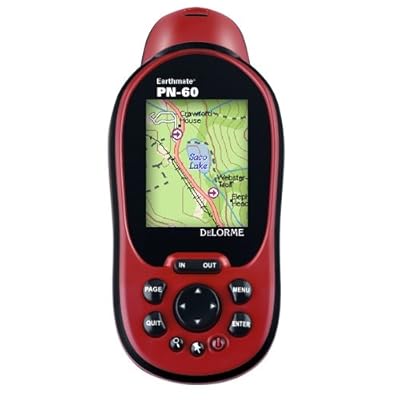
The DeLorme and the eTrex quickly fell out of the competition.  The DeLorme does not support user coordinate systems (a very disappointing shortcoming in an otherwise outstanding GPS unit).  The eTrex does have a user coordinate system setting, but it only works in meters (our custom airport coordinate system is set up in feet).  I was really pulling for the eTrex 20 because it's the cheapest of our test samples ($175 Amazon price), has a good screen, an intuitive menu system and its receiver tracks both the US GPS and the Russian GLONASS satellites.  Alas, Garmin tech support could never figure out how to get it to provide readouts in feet so back to the store it went.

The Trimble Yuma is really a tablet computer running Windows 7.  It is a very capable device, but at the $5,000 price point falls way outside of our test objectives.

The Trimble Juno is an interesting unit.  It is essentially a highly customized PDA that runs Windows Mobile 6.1.  This Juno is really the lowest entry point in terms of price and features for a serious handheld GPS mapping and field data collection device.  Unfortunately the entry price is still too steep for this test - the hardware itself costs around $1,000 and the software needed to do field reconnaissance and data collection - ESRI's ArcPad - runs an additional $400.  A good device, just too expensive and too complex for the non-technical user.

The Trimble TSC-2 seen in the picture above is not really a GPS receiver.  It is a survey-grade data collector that pairs with a high precision GPS receiver via Bluetooth (we use a Trimble R8) .  I threw it into the picture just for comparison.

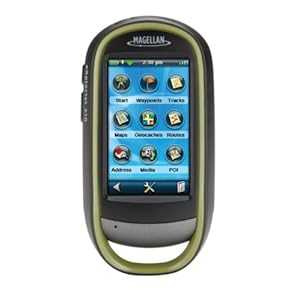
The Magellan 610 pulled ahead early in the competition.  It's a mid-sized unit that's a bit chunky but fits well in the hand.  It uses a touch screen interface and it includes a 3.2 mp camera that geotags each image.  After some fiddling it took our custom coordinate system and returns very good accuracies on the order of +/- 10 ft.   I should mention that a large airport is an ideal location to test potential GPS accuracy since you have open skies horizon-to-horizon.  If the GPS satellite is above the horizon your receiver will see it.  No trees, buildings, towers, etc. in the way.  So please, don't take my accuracy results as gospel.  Your real world results will vary.

Magellan eXplorist 610
A very capable little device

Where the Magellan 610 stumbles is ease of use.  It has a lot of features - GPS, camera, compass, barometer and altimeter.  It is a jack of all trades and, to be honest, most features are fairly well integrated.  However, learning to use them takes time and it's easy to get lost in the touchscreen menu system.  The Magellan also suffers from a disease that afflicts most other consumer grade handheld GPS units - 'gamesmanship'.  In an effort to attract new customers manufacturers like Magellan, Garmin and DeLorme have built their user interfaces around the game or sport of geocaching.  It's a fun game and a great way to get tech savvy kids off their asses and into the outdoors.  The low end GPS manufacturers see this as a market niche they can exploit and have structured most of their unit's features around geocaching.

The problem we face is that geocaching-oriented GPS units makes lousy general purpose or field data collection units.  By focusing on geocaching the manufacturers have ignored the needs of a whole different market segment - the map data developer.

A weak coordinate system library, the lack of a GIS-industry standard vector data format such as the ESRI shapefile, weak data attribution tools on the GPS unit and a weak desktop mapping interface all hinder the use of these units as data collectors.  DeLorme comes the closest with it's XMap desktop GIS software, but the cost is over $800 per license it continues to use a proprietary vector data format linked back to the PN-series receivers.

What the industry needs is a low-end map data collector that has a simplified interface optimized for adding and attributing data collected in the field.  It needs to use industry standard vector and raster data formats and should come with a more robust desktop mapping interface oriented towards the field mapping industry or enthusiast.  Magellan seems to be dipping its big toe back into this market with the Magellan eXplorist Pro 10, but this device still requires a third party software package like ArcPad and offers no improved desktop mapping software.

Magellan eXplorist Pro 10
This is just a re-packaged Magellan 610, but a good start!

So GIS industry wonks, here's what I want:

1. a handheld GPS unit with a large, high resolution screen that is easy to read in broad daylight

2. consumer-grade accuracy using WAAS correction

3. a user interface highly optimized for field data collection - no third party software requirements!

4. a robust horizontal and vertical coordinate system library and the ability to accurately define a user coordinate system

5. a 5 megapixel digital camera with flash

6. the ability to configure field collection jobs or scenarios and save them as project files

7. twelve hour continuous use battery life

8. an external antenna port

9. fully waterproof

10. improved desktop software for device configuration and data download and upload

11. use of industry standard vector and raster data formats

And I want this all at a $700 retail price point.

So get to work.  I expect some nice surprises in your 2013 lineups!
     
- Brian

Saturday, January 7, 2012

A False Sense of Confidence

For Christmas my lovely wife gave me a new GPS receiver.  At work I'm surrounded by some of the most expensive and precise GPS surveying technology available today - devices that can reliably locate you to within a few centimeters of your true position.  What I didn't have was a consumer grade GPS device that I could take out hiking or fishing.  It seems Roberta read my Dear Santa letter and got me a DeLorme PN-60 receiver.

Many of you are probably asking, "why not just use your iPhone?"  Good question.  While I love my iPhone experience has taught me that it makes a lousy GPS receiver.  It may locate you good enough to allow accurate vehicle navigation while cruising up the interstate and it may provide good enough locations to allow you to update your Facebook status, but as a dedicated GPS tool it just doesn't cut it.  To be fair, the iPhone does excel is as an integrated device for wayfinding.  Apple's integration of hardware and mapping software makes the iPhone a wonderful and reliable urban navigation tool.  However, most of this functionality is dependent on a wi-fi or 3G signal, making the device unreliable for use in the backwoods.

What I wanted was a dedicated GPS that is rugged, water resistant, accurate and allows me to upload maps and aerial photos.  The PN-60 seems to fit that bill just fine.


Of course the first thing I had to do is take it out and play with it!  A few days after Christmas I loaded the dogs into the old Volvo wagon and we headed out to one of my favorite parks with walking trails.  This park, Lake Horton, is located in Fayette County and has a number of walking trails that skirt the lake.  Once we got there I leashed up the dogs and set the PN-60 to generate a track file (basically recording my location every 10 feet).  The trail we walked is a 1.8 mile long trace that moves through a mix of topography - some open ground, some heavy canopy cover, some areas where the canopy obscures just half the sky.  It is a good test environment for a GPS receiver.

Let's pause for a minute to review just how GPS works.  The GPS receiver establishes a position by a triangulation process that uses signals from the GPS satellites in orbit around the Earth.  A GPS receiver needs good signals from at least three GPS satellites to calculate a useable position in 2 dimensions (horizontal).  Note that the key word here is useable, not accurate.  To get a useable 3 dimensional position (throwing elevation into the mix) the receiver needs good signals from at least four satellites.  The accuracy of the position your receiver calculates is highly dependent on a number of factors such as satellite geometry (where they are in the sky overhead), how healthy the satellites are (yes, there are 'healthy' and 'unhealthy' GPS satellites), the amount of overhead interference (things like heavy tree cover, tall buildings, etc.) and the overall sensitivity and accuracy of the receiver itself.  All of these factors have a vote in how accurate or inaccurate you GPS location will be.  The only fixed variable in this equation is the capability of your GPS receiver; all other factors can vary from minute-to-minute and location to location.

Just how accurate can a GPS receiver be?  The US Air Force, which operates the GPS system, states that civilian users can expect the GPS system to provide position fixes to within 100 meters 95% of the time.  That's pretty darned conservative and assumes a very basic early generation receiver that is not applying any modern GPS correction signals from systems like the WAAS satellites (Wide Area Augmentation System).  

The civilian GPS industry tosses around the number 15, as in 15 meters.  A modern consumer grade GPS receiver operating under open sky and in the static mode (not moving) should provide a fix to within 15 meters (49 feet).  If the receiver is WAAS-capable (and most are) then that potential accuracy should drop to about 3 meters (10 feet). This is about the best a modern consumer grade GPS unit can be expected to do.

This big improvement in accuracy has come through improved receiver hardware and software.  GPS receiver manufacturers have gotten pretty good at this business over the past 20 years and they've developed some nifty tricks to greatly improve overall accuracy and satellite signal acquisition speed and lock.  A modern GPS receiver, even a relatively inexpensive recreational unit like the PN-60, is a marvel of modern hardware and software design.

Now back to our regularly scheduled blog post...

So the dogs and I walked the 1.8 mile trail and then rushed home to upload the GPS track file to the DeLorme Topo North America desktop software to see what was recorded.

Zoomed out it looked sort of OK; at least I was on the right part of the world.

DeLorme Topo North America 9.0 (click on image to enlarge)

But when I zoomed in to specific sections of the track I noticed some concerning issues with how the recorded GPS track was lining up with the portions of the trail visible in the image.

25 ft. offset between the walking trail and the GPS track
(click on image to enlarge)

Note the high tension lines running north-south across the image.  This is a potential source of interference.

Next:

38 ft. offset between the walking trail and the GPS track
(click on image to enlarge)

Note the heavy canopy coverage immediately south of the trail.  Heavy tree canopy can either block or interfere with GPS signal quality.

Next:

An average 10.2 ft. offset on a section of trail with light overhead canopy
(click on image to enlarge)

In an area with fairly open sky (and well away from powerlines) the average offset drops to just over 10 feet, perfectly acceptable accuracy for this receiver operating in the moving mode.

Next:

Offsets ranging from 14.5 ft. to almost 25 ft. in an area of completely open sky
(click on image to enlarge)

What's going on here?  This is an area of completely open sky - no trees or other obstructions.  Accuracy should be much better than what we are seeing here.  Well, if you look closely you can just make out the trace of the high tension power lines cutting across the lower right hand corner of the image.  My suspicion is that the powerlines are interfering with the GPS signals.

And last:

Two sample areas in close proximity - one showing a 60.7 ft. offset and
one showing almost negligible offset
(click on image to enlarge)

This example clearly illustrates the impact of heavy tree canopy cover.  The upper measurement, taken in an area of dense canopy cover, shows an almost 61 foot offset between the walking path and the GPS track.  However, just 55 feet to the south, under fairly open sky (and with no power line interference) the offset is so small as to be negligible.

So what can we learn from this simple example?  Let's review:

1. The manufacturer's stated GPS accuracies are for their products operating under the most ideal conditions - open sky, with good satellite geometry and no electromagnetic interference.  Your real world results can, and will, vary widely.

2. Overhead or adjacent obstructions like trees can have a dramatic effect on GPS accuracy.

3. Unseen influences like nearby powerlines can have significant impact on GPS accuracy.

4. In areas of little obstruction or interference consumer grade GPS receivers can achieve their claimed accuracy of +/- 3 meters (10 feet) in the moving (tracking) mode.

So what can you do to improve your GPS receiver's accuracy?  Here's a few tricks:

1. Make sure WAAS is turned on.  On most receivers sold in the US it is turned on by default, but you still need to check.

2. Make sure position averaging is turned on.  While this won't help when moving, when stopped to record a position (waypoint) if you let the receiver average your position for a few seconds before storing it your accuracy can improve dramatically.  When collecting waypoints I'll try to let the receiver average between 5 and 10 seconds before storing the point.

3. Hold or carry the receiver so that the antenna is fully and properly exposed to the sky.  Don't expect a GPS receiver buried deep inside a backpack or tucked inside a shirt pocket to return a good position.  Your receiver has to 'see' the GPS signals and anything you can do to improve it's view of the sky will result in more accurate positions.

Understand your potential sources of error!  Remember how the system works - radio signals from space.  If you understand what can interfere with those signals and you remain observant of your environment you can often work around these sources of error.

So many people I talk to about GPS have a false sense of confidence about GPS accuracy.  The vast majority think their receiver is far more accurate than it really is.  While the GPS satellite system and our modern receivers are true marvels of modern technology the system still has plenty of real world limitations.

Brian

Note: I do have to add that the measurements I show in the images above also have a lot of built-in but uncontrollable error.  The DigitalGlobe images I'm measuring against have an advertised resolution of 30 centimeters (roughly 1 foot).  Assuming these images were processed without a tight orthorectification their inherent positional error can range from 2 - 5 feet (my estimation).  In this blog post I'm not trying to establish absolute accuracies or inaccuracies for a given receiver.  I just want to give the reader as sense of what impact physical and electromagnetic interference can have on GPS accuracy.